Dear friends! ❤️
If you are seeing this page, it means you are among the very first people to try Your Perfume Guide before its official launch.
The app is currently in its testing stage, and it is very important for me to understand how easy and intuitive it actually is to use: whether you can easily find the city or store you are looking for, whether the navigation makes sense, whether everything works the way you expect it to — and whether at any point you find yourself wondering, “What on earth am I supposed to click here?” 🙂
So I would be very grateful for any feedback — good or bad. If something feels inconvenient, confusing, unnecessary or, on the contrary, if there is something you feel is missing, please let me know. I am completely open to criticism — now is exactly the right time for it.
At the bottom of this page, you will find a short feedback form where you can leave comments, suggestions, ideas, or simply tell me what you think of the app.
If you would rather contact me via Instagram or Telegram or simply send me a voice message instead of typing — I will be equally grateful for any of these options 🙂
Thank you for helping me make Your Perfume Guide better before its official launch! ❤️
How to add the app to your device:
Feedback
If you are seeing this page, it means you are among the very first people to try Your Perfume Guide before its official launch.
The app is currently in its testing stage, and it is very important for me to understand how easy and intuitive it actually is to use: whether you can easily find the city or store you are looking for, whether the navigation makes sense, whether everything works the way you expect it to — and whether at any point you find yourself wondering, “What on earth am I supposed to click here?” 🙂
So I would be very grateful for any feedback — good or bad. If something feels inconvenient, confusing, unnecessary or, on the contrary, if there is something you feel is missing, please let me know. I am completely open to criticism — now is exactly the right time for it.
At the bottom of this page, you will find a short feedback form where you can leave comments, suggestions, ideas, or simply tell me what you think of the app.
If you would rather contact me via Instagram or Telegram or simply send me a voice message instead of typing — I will be equally grateful for any of these options 🙂
Thank you for helping me make Your Perfume Guide better before its official launch! ❤️
Quick navigation:
What is Your Perfume Guide about?
How the app works
How to add the app to your device:
What is a PWA?
What is Your Perfume Guide about?
How the app works
How to add the app to your device:
What is a PWA?
What is Your Perfume Guide about?
Your Perfume Guide is a guide to perfume shops and boutiques in more than 200 cities and regions around the world: from mono-brand boutiques to small independent perfumeries and large multi-brand stores. The guide includes their addresses and, for multi-brand stores, lists of the brands they carry. The guide is regularly reviewed and updated.
For each city, Google Maps/Apple Maps with all perfume locations are available, while the search function makes it easy to find cities, stores and brands. Shops you like or plan to visit can be saved to Saved, while my personal favourites 🙂 are marked as Editor’s Pick.
Compared with the website, I find the app much more convenient and easy to navigate: browsing and searching are simpler, especially when you need the guide while you’re out and about.
Your Perfume Guide is a guide to perfume shops and boutiques in more than 200 cities and regions around the world: from mono-brand boutiques to small independent perfumeries and large multi-brand stores. The guide includes their addresses and, for multi-brand stores, lists of the brands they carry. The guide is regularly reviewed and updated.
For each city, Google Maps/Apple Maps with all perfume locations are available, while the search function makes it easy to find cities, stores and brands. Shops you like or plan to visit can be saved to Saved, while my personal favourites 🙂 are marked as Editor’s Pick.
Compared with the website, I find the app much more convenient and easy to navigate: browsing and searching are simpler, especially when you need the guide while you’re out and about.
How the app works
Your Perfume Guide does not need to be downloaded from the App Store or Google Play. It is a web app that can be added directly from the website to the Home Screen of your phone or tablet. Your Perfume Guide will then be available from its own icon — much like a regular app.
Important: you do not need to download any installation files, allow apps from unknown sources, or change any security settings on your device. The app is added using the standard features of your browser.
Official app link:
https://your-perfume-guide.vercel.app/
Open this link on your phone or tablet and then follow the instructions for your browser below.
Your Perfume Guide does not need to be downloaded from the App Store or Google Play. It is a web app that can be added directly from the website to the Home Screen of your phone or tablet. Your Perfume Guide will then be available from its own icon — much like a regular app.
Important: you do not need to download any installation files, allow apps from unknown sources, or change any security settings on your device. The app is added using the standard features of your browser.
Official app link:
https://your-perfume-guide.vercel.app/
Open this link on your phone or tablet and then follow the instructions for your browser below.
How to add the app to your device:
iPhone / iPad — Safari
1. Open Your Perfume Guide in Safari.
2. Tap “Share” (the square icon with an upward arrow).

3. Select “Add to Home Screen”.

4. You can change the app name before adding it to your Home Screen.
5. Tap “Add”.
The Your Perfume Guide icon will appear on your Home Screen.
1. Open Your Perfume Guide in Safari.
2. Tap “Share” (the square icon with an upward arrow).
3. Select “Add to Home Screen”.
4. You can change the app name before adding it to your Home Screen.
5. Tap “Add”.
The Your Perfume Guide icon will appear on your Home Screen.
iPhone / iPad — Google Chrome
1. Open Your Perfume Guide in Google Chrome.
2. Tap “Share” (the square icon with an upward arrow). The button is usually located to the right of the address bar.
3. Select “Add to Home Screen”.

4. You can change the app name before adding it to your Home Screen.
5. Tap “Add”.
The Your Perfume Guide icon will appear on your Home Screen.
1. Open Your Perfume Guide in Google Chrome.
2. Tap “Share” (the square icon with an upward arrow). The button is usually located to the right of the address bar.
3. Select “Add to Home Screen”.
4. You can change the app name before adding it to your Home Screen.
5. Tap “Add”.
The Your Perfume Guide icon will appear on your Home Screen.
Android — Google Chrome
1. Open Your Perfume Guide in Google Chrome.
2. Tap the ⋮ menu (the three dots, usually located to the right of the address bar).
3. Select “Install” (in some versions, “Install and create shortcut”).
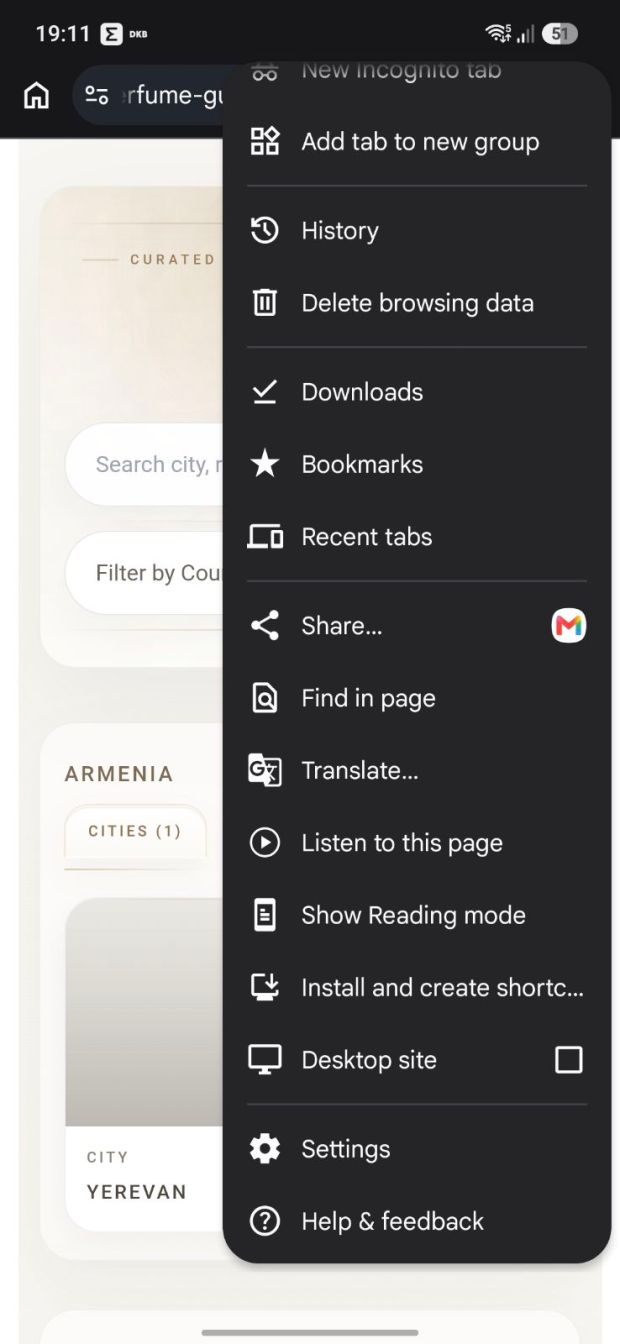
4. Confirm the installation in the window that opens.
Once installed, the Your Perfume Guide icon will appear on your Home Screen or in your app list.
1. Open Your Perfume Guide in Google Chrome.
2. Tap the ⋮ menu (the three dots, usually located to the right of the address bar).
3. Select “Install” (in some versions, “Install and create shortcut”).
4. Confirm the installation in the window that opens.
Once installed, the Your Perfume Guide icon will appear on your Home Screen or in your app list.
Android — Firefox
1. Open Your Perfume Guide in Firefox.
2. Tap the ⋮ menu.
3. Select “Add app to Home screen”.
4. Confirm in the window that opens.
The Your Perfume Guide icon will appear on your Home Screen.
1. Open Your Perfume Guide in Firefox.
2. Tap the ⋮ menu.
3. Select “Add app to Home screen”.
4. Confirm in the window that opens.
The Your Perfume Guide icon will appear on your Home Screen.
What is a PWA?
Your Perfume Guide uses PWA (Progressive Web App) technology — a modern format for web applications. The app runs through the website, but it can be added to the Home Screen of your phone or tablet and opened directly from its own icon.
There’s no need to install updates manually. Whenever Your Perfume Guide is updated, the latest version will automatically become available through the same icon on your device. There’s no need to reinstall or add the app again.
I would, however, recommend closing YPG completely from time to time rather than leaving it running in the background. In my experience, updates can sometimes take longer to appear if the app has been left open.
Using a different browser? In Opera, Edge, Samsung Internet and other browsers, the app can also be added to your Home Screen. The name and location of the command may vary depending on your browser and operating system version. Look in your browser menu for options such as “Add to Home Screen”, “Install app”, “Install” or similar commands.
Your Perfume Guide uses PWA (Progressive Web App) technology — a modern format for web applications. The app runs through the website, but it can be added to the Home Screen of your phone or tablet and opened directly from its own icon.
There’s no need to install updates manually. Whenever Your Perfume Guide is updated, the latest version will automatically become available through the same icon on your device. There’s no need to reinstall or add the app again.
I would, however, recommend closing YPG completely from time to time rather than leaving it running in the background. In my experience, updates can sometimes take longer to appear if the app has been left open.
Using a different browser? In Opera, Edge, Samsung Internet and other browsers, the app can also be added to your Home Screen. The name and location of the command may vary depending on your browser and operating system version. Look in your browser menu for options such as “Add to Home Screen”, “Install app”, “Install” or similar commands.
Feedback

